


I’m a little obsessed with building mini-tools.
In 2022 I built the Viral Post Generator. It hit over a MILLION users in 24 hours 🤯, got covered by BuzzFeed and The Guardian, and sold within a week. Building it took weeks of no-code headache, plus my brother writing code and setting up AWS.
Today I can build tools like that with one prompt.
I personally use Base44 for vibe-coding. It’s easy: you just describe what you want → it builds it, designs it, hosts it, and publishes it.
Upgrade to an annual subscriptio to get a free year of Base44, worth $240. That’s more than the newsletter subscription costs. Seems like a no-brainer to me 🎉
**Codes are limited and first come, first served. Your code is only secured once you claim it. On a monthly plan? Switch to annual.
In today’s article: 9 tools worth building, the exact prompt for each, a live example, and how to get people to use them. Let’s go:
Free tools to give your audience 🎁
Free tools are a clever way to get someone’s email address. Tie the tool to what you sell, and every user is a lead. You can follow up with them later, and sell your main product.
1. Grader 💯
Let people grade something they are insecure about.
Say you sell email marketing software: score people’s cold emails. Landing-page software: score their current landing page. Cloud security software: score their posture. Anything your audience is responsible for → grade it.
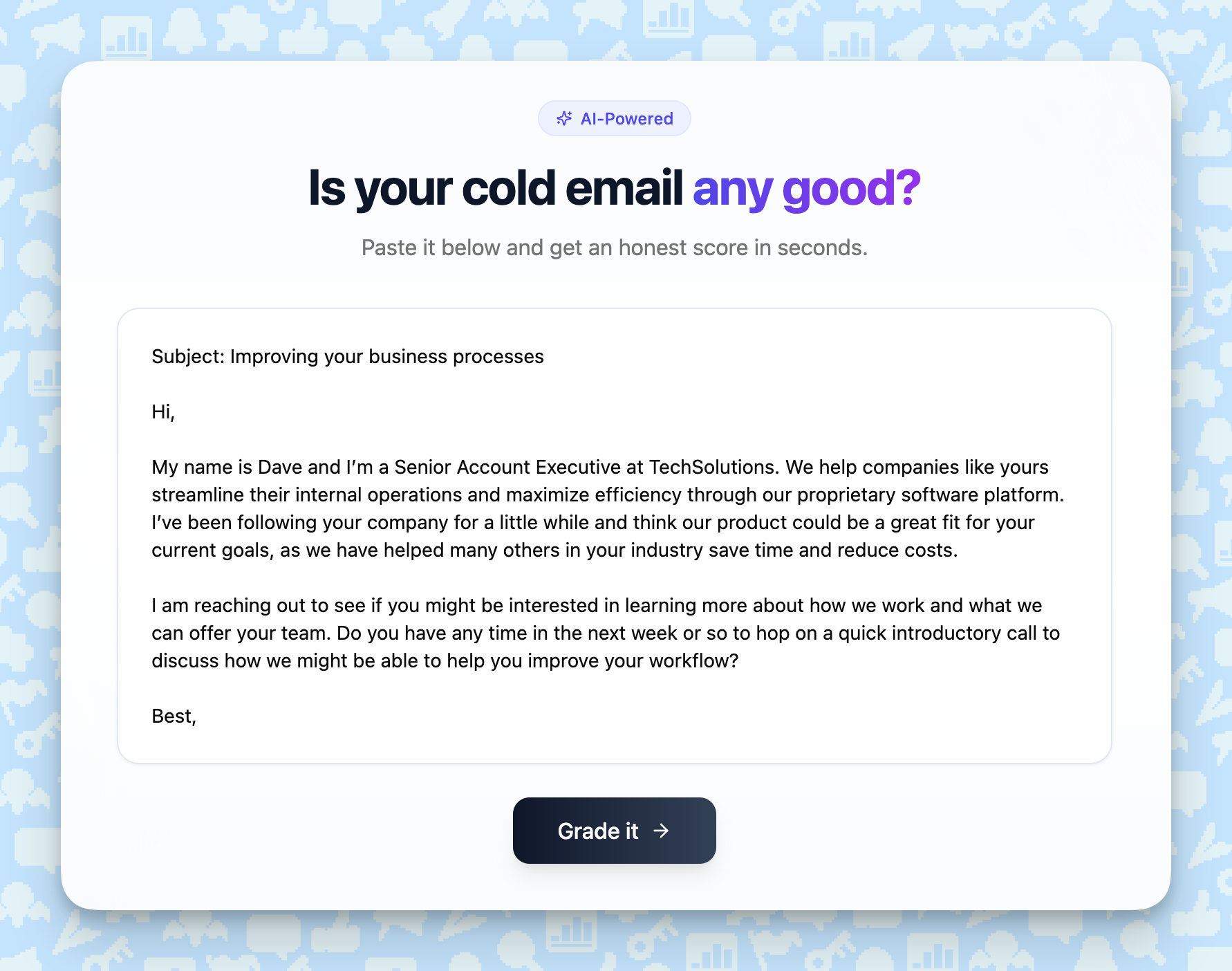
Users get a number out of 100 and a list of things to fix (you can also pitch your product to fix everything for them).
THE PROMPT
Build a single-page web app called “[Cold Email Grader]”. What it does: a user pastes their [cold email] and clicks “Grade it.” Use AI to score it 0-100, split across 5 criteria (20 points each): [subject line, opening line, personalization, clarity of the ask, length]. For each criterion, show the score plus one specific, blunt tip that quotes the exact line that needs fixing. Never give generic advice like “add more personalization” - always reference their actual text. Layout: total score huge at the top (red under 50, yellow 50-75, green above 75), then 5 criterion cards below it. Under the results, an email field labeled “Want the full line-by-line teardown? We’ll send it over.” The score itself is free, no email needed. Pre-fill the input with a mediocre example [cold email] so visitors instantly see how it works. Clean SaaS look, lots of white space, mobile-friendly, no signup. Footer: “Built by [your brand]” linking to [your site].
Get people using it: roast real cold emails you’re receiving day-to-day (maybe censor the sender name), and post the public teardown on LinkedIn or X. Include a link to let people grade their own cold email.
Live demo: https://tom-orbach-grader.base44.app
2. Cost calculator 💰
Show people the yearly price of their problem.
Say you sell automation software: estimate the yearly cost of the time their team spends on manual work. If you sell a hiring tool: calculate the cost of a role sitting open. Anything that costs your audience → calculate how much.
THE PROMPT
Build a single-page calculator called “[How much is manual work costing you?]”. Inputs: three sliders with number boxes: [team size, hours per person per week spent on manual work, and average hourly cost]. Pre-fill with realistic values (10 people, 6 hours, $65) so a result shows the moment the page loads. The result recalculates live as you drag. The math: [people x hours x cost x 52] = the annual cost. Show that number huge, formatted like “$202,800 a year.” Under it, translate it into two comparisons the reader can feel: [how many full-time salaries that equals, and how many workdays burned per year]. Below the result, one line: “That’s the bill for doing this by hand.” Then a big CTA button labeled “See how [your product] kills this cost” pointing to [your URL]. No AI needed, pure math. Sleek SaaS look, one accent color, mobile-friendly, no signup. Footer: “Built by [your brand].”
Get people using it: put it in cold emails, cold DMs and sales decks with their number already filled in (based on your estimations). Say that you personally analyzed everything for them.
Live demo: https://tom-orbach-calculator.base44.app
3. Generator 🎰
If your product makes something (copy, designs, names) → give away a tiny free version of it.
Say you sell a copywriting tool: a generator that turns someone’s product into 10 taglines. If you sell a design tool, generate a color palette from their brand.
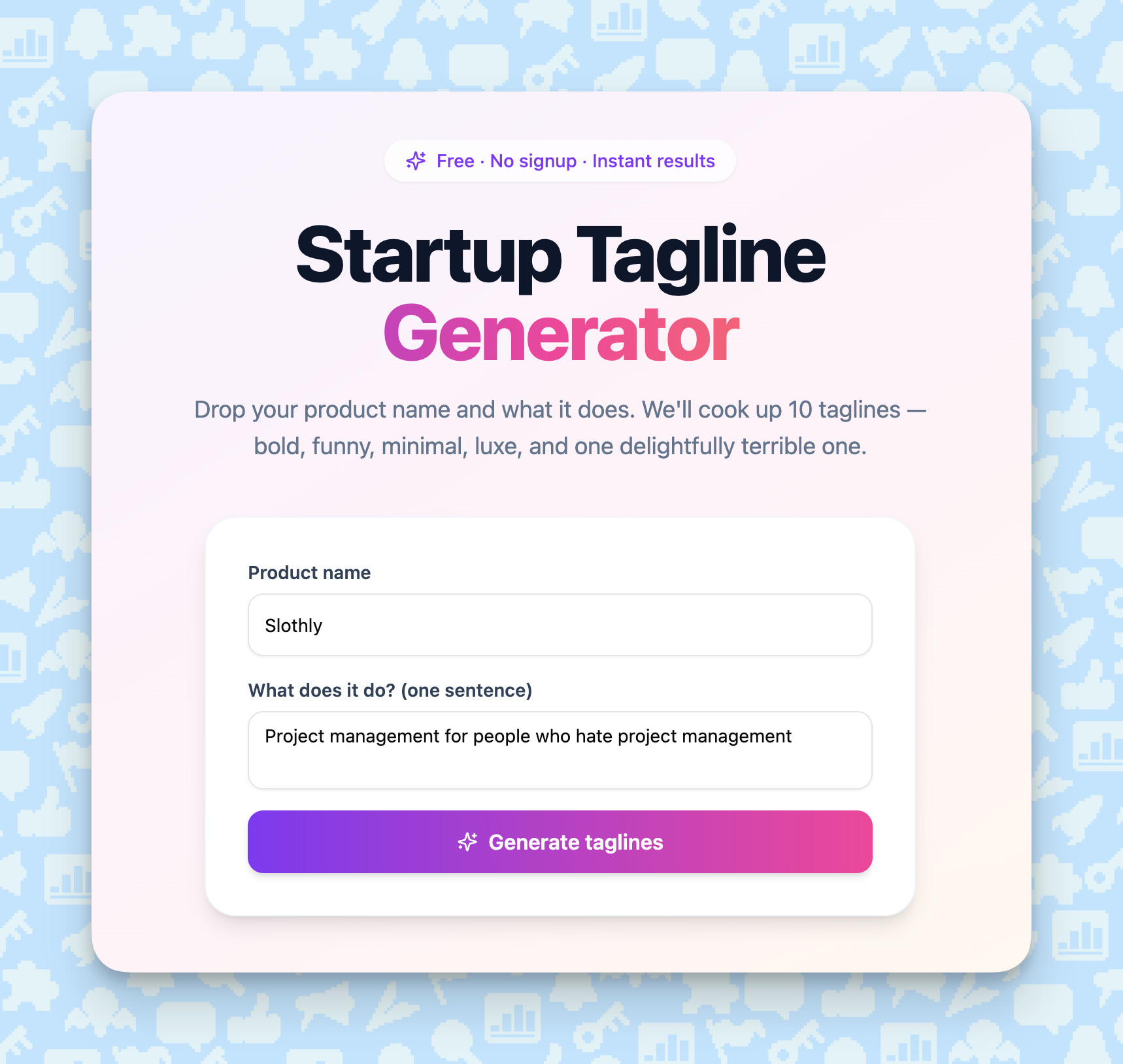
People share the result because it’s about THEM. That’s how my Viral Post Generator spread to 2 million people.
THE PROMPT
Build a single-page web app called “[Startup Tagline Generator]”. Inputs: [their product name, plus one sentence on what it does]. Pre-fill with a fun example (”Slothly - project management for people who hate project management”) so the page never looks empty. On “Generate,” use AI to write 10 [taglines] in a mix of styles: bold, funny, minimalist, luxury, and one intentionally so-bad-it’s-good (label that one “the cursed one”). Keep each under 8 words. Ban the words “unlock,” “empower,” “supercharge,” and “elevate.” Each result is a card with a copy button and a “post this” button that opens a pre-written share for X or LinkedIn using the name the user typed (”I just generated taglines for Slothly. Look at #7.”). Add a “Generate 10 more” button. Playful, colorful design, big type, a small confetti burst when results load. Mobile-friendly, no signup, results appear without an email. Footer: “Built by [your brand]” linking to [your site].
Get people using it: run it for 5-10 famous brands, post the funniest results on social, and link the tool so people make their own.
Live demo: https://tom-orbach-generator.base44.app
4. Game 🕹️
Build a simple mini-game around your topic.
Say you sell ad software: a “Real or AI?” game where people guess which ads a human wrote. If you sell a copywriting tool, do the same with headlines.
THE PROMPT
Build a game called “Real or AI?”. How it works: show the player one [brand tagline] at a time with two big buttons, “A human wrote this” and “AI wrote this.” After each guess, reveal the answer with a one-line fact (for the real ones, name the brand and the year). 10 rounds per game, score counter at the top. Content: ship it with a built-in bank of 30 items - 15 real [taglines] from famous brands ([Nike, Avis, De Beers, Dollar Shave Club] and similar) and 15 AI-written ones generated in the same style. Store which is which, shuffle each game. No AI calls during play, so rounds feel instant. End screen: the score as a shareable card (”I scored 7/10 on Real or AI. Can you beat me?”) with a share button and “Play again.” Track and show a running global average score for comparison. Game-show energy: bold colors, quick flip animations. Mobile-first, no signup. Footer: “Built by [your brand].”
Get people using it: run a contest on social media (with real prizes) - tell people to comment their score (or even better: tell them to publish an entire post with the score screenshot).
Live demo: https://tom-orbach-game.base44.app
5. Quiz 🔮
Sort people into “types” they'll want to share.
Say you sell marketing software: a “What’s your marketing superpower?” quiz. If you sell a sales tool, make it “What kind of Closer are you?”
Make every result flattering, so people post it.
THE PROMPT
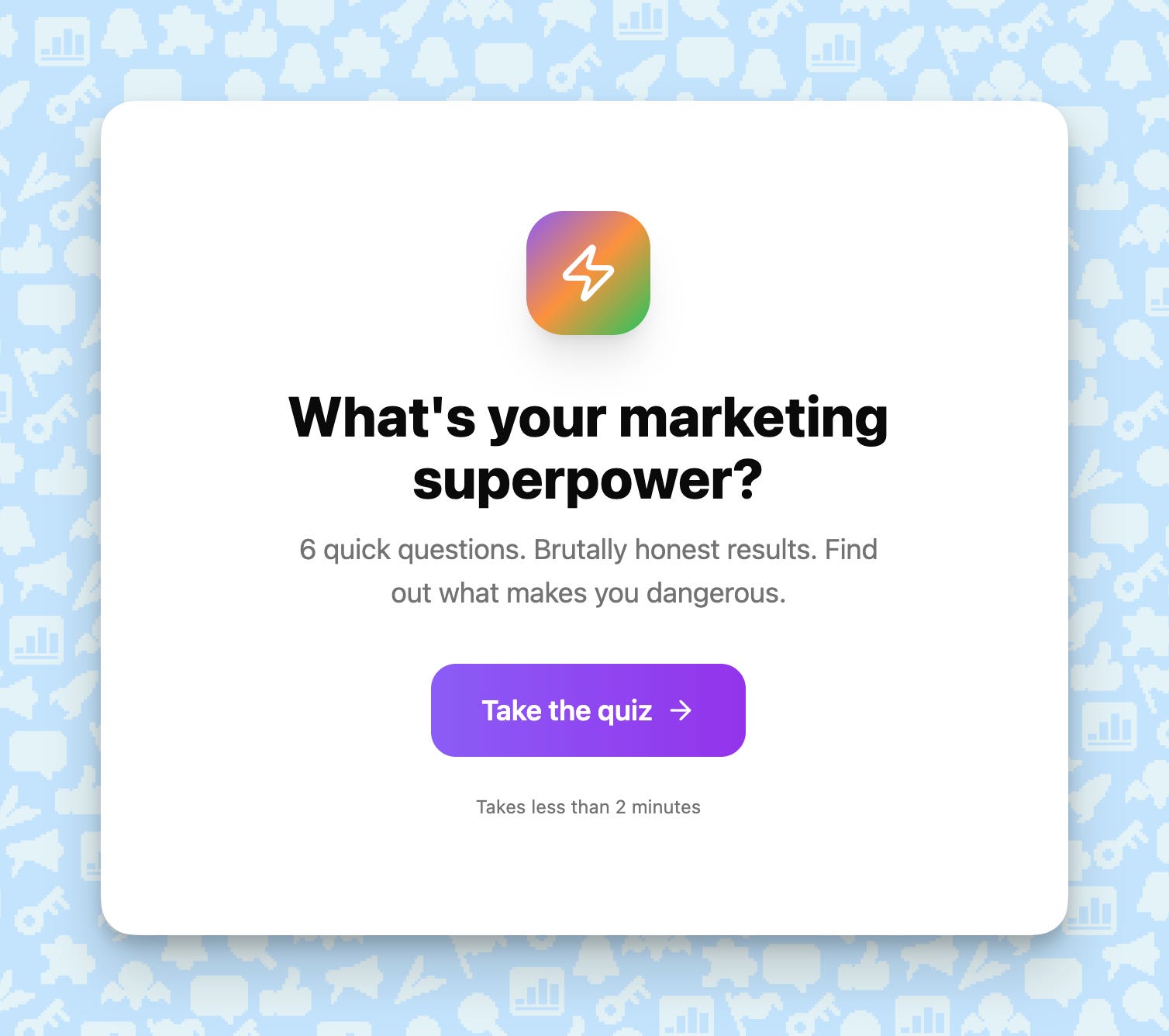
Build a personality quiz called “[What’s your marketing superpower?]”. Format: 6 multiple-choice questions, 4 options each, one on screen at a time with a progress bar. Write the questions about real situations [marketers] face (”Your launch flopped. What do you do first?”) with answers that are funny but revealing. Scoring: each answer maps to one of 4 types: [The Storyteller, The Analyst, The Hacker, The Builder]. Most-picked type wins. No AI needed. Before showing the result, ask for an email with the line “Where should I send your full breakdown?” Then the result page: the type name, a big badge graphic, a flattering 3-4 sentence description accurate enough to screenshot, plus the one blind spot that type has (people share the blind spot more than the compliment). A share button pre-written with the result (”I’m The Hacker 🥷 What’s your marketing superpower?”). Bright, playful design with a distinct color per type. Mobile-first, fast taps. Footer: “Built by [your brand].”
Get people using it: pay a few micro-influencers to use the quiz and post their own result on social. The snowball will roll from there.
Live demo: https://tom-orbach-quiz.base44.app
Tools you keep for yourself ⚙️
The next tools are internal, for you and your team. They can save your time, resources, and budget.
6. UTM link builder 🔗
If your team builds campaign links all day, build an internal UTM builder.
This is useful since generic generators (you can find online) require you to fill in the parameters by hand, every time.
THE PROMPT
Build an internal tool called “UTM Link Builder”. Inputs: a URL field, then dropdowns for source ([google, linkedin, x, newsletter, facebook, podcast]), medium ([cpc, email, social, referral, organic]), and campaign (free text with autocomplete from past entries). Optional term and content fields, collapsed by default. Output: the full tagged URL in a big copy box, built live as fields change. Lowercase everything and replace spaces with dashes automatically so links stay consistent. Below the builder: a searchable table of every link ever created (URL, source, medium, campaign, who made it, date), saved to a shared database so the team sees the same list. A “duplicate” button per row so recurring campaigns take one click. If someone builds a link that already exists, show “this one exists” and point to the row instead of saving a copy. No AI needed. Clean utility design, dark mode toggle, keyboard-friendly. Anyone with the link can use it.
Put it to work: keep it in your team wiki (or pin it to a Slack channel) so everyone uses the same format.
Live demo: https://tom-orbach-utm.base44.app
7. Content repurposer ♻️
If you publish long content, build a tool that turns a post into a bunch of short content.
Paste a long post in, get tweets, a LinkedIn post, an email, and a few hooks back.
THE PROMPT
Build an internal tool called “Repurpose This”. Input: one big text box where I paste a long [blog post, newsletter issue, or transcript] (up to 10,000 words), plus a small field for the link to the original. On “Repurpose,” use AI to produce, in labeled boxes: [5 standalone X posts (each a complete thought, no threads, no hashtags), 1 LinkedIn post (short lines, a hook in the first sentence, no emojis), 1 plain-text email (100 words max, one link to the original), and 3 alternative opening hooks for the piece itself]. Every output must reuse the source’s actual phrases and numbers. Ban filler and the words “game-changer,” “dive in,” “unlock.” Each box gets its own copy button plus a “regenerate just this one” button. Show a word count under each output. Minimal single-screen design: outputs in a 2-column grid on desktop, stacked on mobile. Built for internal use, speed over prettiness.
Put it to work: run every long piece through it before you publish.
Live demo: https://tom-orbach-content-loop.base44.app
8. Subject-line previewer 📬
If you send a lot of email, build a tool that shows how your subject line looks before you send it.
It shows the line in Gmail, Apple Mail, and Outlook, including where it gets cut off and which words trip spam filters.
THE PROMPT
Build a tool called “Subject Line Preview”. Inputs: subject line and preview text, updating the mockups live as I type. Pre-fill both with a real example so the page loads looking alive. Output: three realistic inbox mockups side by side - Gmail desktop, Apple Mail on iPhone, Outlook desktop - each showing exactly where the subject line and preview text get cut off at that client’s real character limits. Make the mockups look like the actual inboxes: sender name ([Tom from Marketing Ideas]), timestamp, unread dot. Below the mockups: a character counter that turns red past each client’s limit, a flag list of spam-trigger words found in the line (free, guarantee, act now, limited time, $$$, words in ALL CAPS), and a warning if the line leans on an emoji as its first character. No AI needed, all rules hard-coded. Clean, precise design that feels like a pro email tool. Mobile-friendly, no signup. Footer: “Built by [your brand].”
Put it to work: check every email here before it goes out.
Live demo: https://tom-orbach-subject-line-preview.base44.app
9. Brief generator 📄
Build a tool that turns 5 answers into a clean one-page brief.
It makes it much easier to hand off tasks to your team and keep everyone on the same page.
THE PROMPT
Build an internal tool called “Campaign Brief Generator”. Flow: 5 short questions, one at a time: [(1) the goal and its number, (2) who exactly the audience is, (3) main channel and supporting channels, (4) budget and what it mostly goes to, (5) deadline and hard constraints]. Each question shows a placeholder example answer so people know the expected depth. On submit, use AI to expand the 5 answers into a one-page brief with these sections: Objective, Audience, Key message, Channels, Budget, Timeline, Success metrics, Out of scope. Keep it tight - it must fit one page. Where an answer is too vague, the brief shows a highlighted “NEEDS AN ANSWER” line instead of inventing details. Output: a clean document layout with “Copy to clipboard” and “Download as PDF” buttons, plus an edit mode so people can tweak lines before exporting. Professional document look, like a well-formatted Notion page. Built for internal use.
Put it to work: require a brief from this tool before any campaign starts.
Live demo: https://tom-orbach-brief-build.base44.app

Hit reply and show me what you are vibe-coding! I’d love to feature it in a future newsletter.
See you next week ✌️
Tom
(In case you’re wondering, Base44 didn’t pay me a dollar for this. I just like building things with it, so I asked them for a free year for my readers. They said yes. Good people.)
https://ideagrit.foundersailab.com
Pre mortem your idea before you commit your time money and energy doing the wrong thing.
I built a landing page grader and a substack profile generator using Lovable (only heard about base44 today).
The landing page grader gives a conversion score and how to increase it by giving out short analysis and rewrite suggestions. This works perfectly for an opt-in page.
The substack profile generator as its name is giving out a conversion-focused bio and welcome page banner+sub headline to turn visitors into clients.
Vibe coding AI tools is the nextgen lead magnet for sure 👍